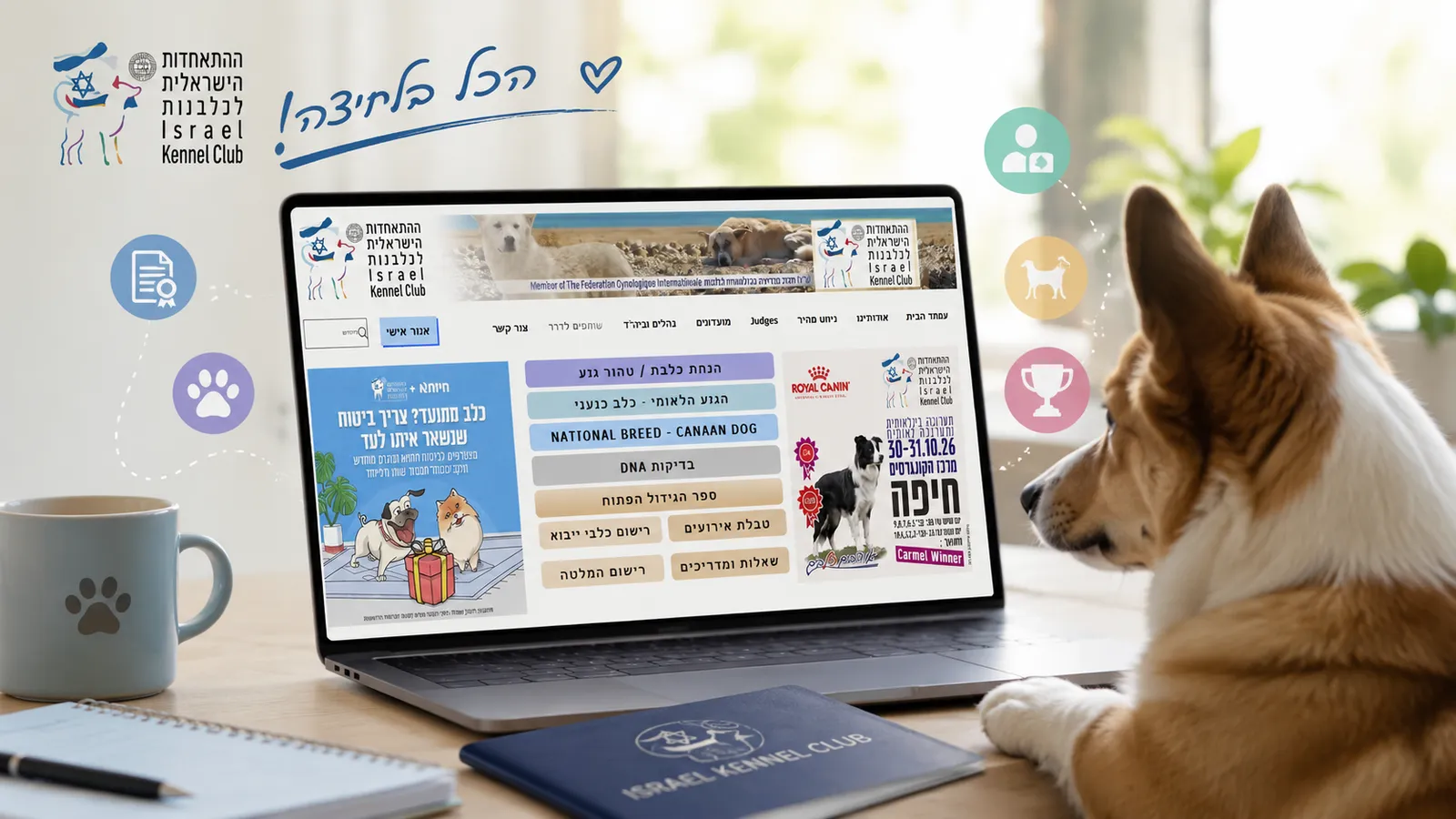
If your dog is registered with the IKC (Israel Kennel Club / ההתאחדות הישראלית לכלבנות), much of the information about your dog, as well as many useful services, is available online through your personal account.
Here you can view the dogs registered in your name and their titles, download a digital pedigree, order documents, pay club membership fees, obtain confirmation for a reduced annual municipal dog licence fee, register your dog for a show, and download the judge’s report after the show.
The website interface is primarily in Hebrew, so below we will show you where to find the main functions and explain what each section means.
How to Log In to Your IKC Personal Account
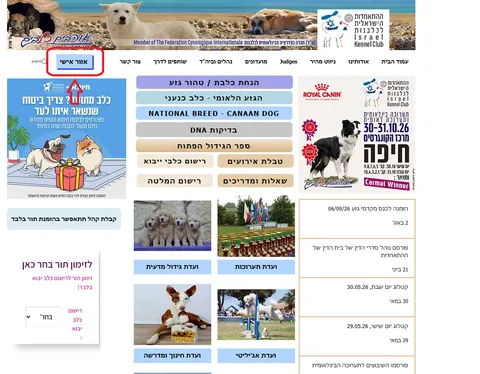
Go to the Israel Kennel Club website and click אזור אישי — “Personal Area.”
To log in, use the mobile phone number of the owner registered in the IKC database. Enter the phone number and follow the system instructions to verify your login.
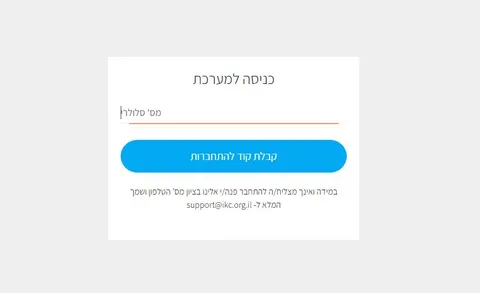
If the puppy was registered by the breeder, the database should contain the phone number of the person in whose name the dog was registered.
Once logged in, you will be taken to your personal account.
First, Check Your Personal Details
In the personal account menu, you will find the section:
הפרופיל שלי — “My Profile”
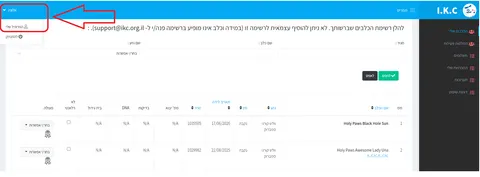
This section contains:
- the owner’s name in Hebrew;
- the owner’s name in English;
- email address;
- home/postal address;
- phone number.
You cannot change the phone number yourself, but the other details can be edited if necessary.
It is worth checking these details straight away, as the IKC uses them when issuing various documents and processing applications. Ordered documents, payment confirmations and instructions may also be sent to the email address listed in your profile.
After making any changes, remember to click שמור — “Save.”
My Dogs
One of the main sections of the personal account is:
הכלבים שלי — “My Dogs”
This section displays the dogs registered in your name with the IKC. They are listed from youngest to oldest.
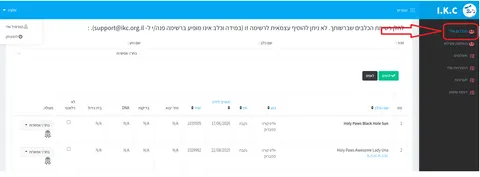
The dog’s profile shows its official name and other information registered in the system. Any titles awarded to the dog are also displayed here.
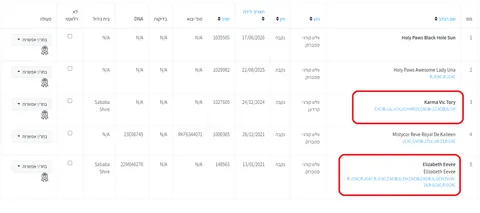
This is particularly important for dogs participating in shows: when you register for a show, the system takes the dog’s existing titles into account and offers the show classes for which it is eligible.
If your dog has already earned a title but it does not appear in your personal account, the IKC recommends contacting its support service.
Don’t Rush to Tick the V Box
Next to each dog, there is an option to mark it as לא רלוונטי — “Not relevant.”
This function is intended, for example, for dogs that have passed away or when the owner no longer wants the dog to appear among those available for show registration. Once this box is checked, some actions for that dog become unavailable.
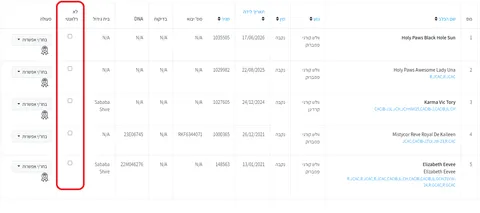
If you ticked the box accidentally, clicking it again will remove the mark.
Your Dog’s Pedigree
For dogs born in Israel, a digital pedigree is available through the personal account. It can be downloaded and saved as a PDF.
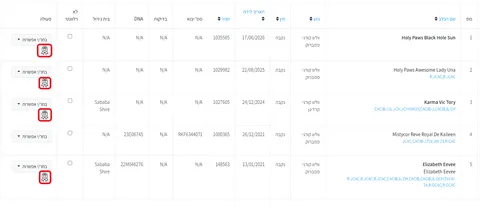
This gives you access to your dog’s pedigree at any time without having to look for the paper document.
Keep in mind that the digital pedigree and some of the official documents that can be ordered separately from the IKC are not the same thing.
Documents and Services Available for a Specific Dog
Each dog has a menu containing the actions available for that dog.
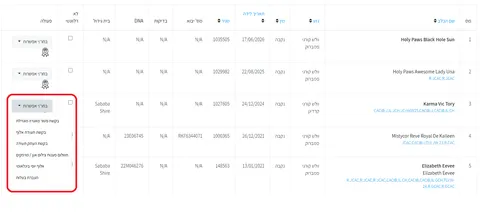
The exact options may vary depending on the dog and the circumstances, but the IKC personal account provides, among others, the following services.
Confirmation of Eligibility for a Reduced Annual Fee
For owners of intact pedigree dogs, this is one of the most useful functions.
Members of the relevant IKC clubs/sections who meet the required conditions can obtain confirmation entitling them to a reduced annual municipal fee for keeping an unspayed or unneutered dog.
In the dog’s menu, this service is called בקשת פטור מאגרה מוגדלת.
Before submitting the request, make sure your details in הפרופיל שלי are correct, especially your email address.
In the application, you will need to select the municipality under which you reside.
Please note that this confirmation can only be requested through the personal account by the dog’s registered owner.
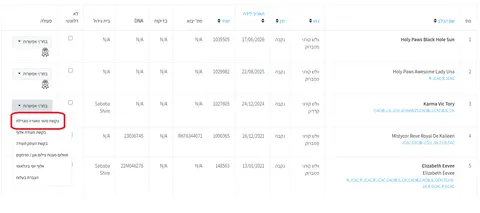
Fees and eligibility conditions may change, so we deliberately do not list specific amounts here. It is best to check the current rates immediately before making a payment.
One more important point: your dog’s pedigree does not replace the IKC confirmation required to receive the reduced fee.
Official Evaluation of Hip and Elbow X-rays
Through the dog’s profile, you can pay for the official evaluation of:
- hip X-rays;
- elbow X-rays;
- both examinations.
After payment, the IKC sends the owner an email confirmation, instructions for the examination and a form to be completed by the veterinarian.
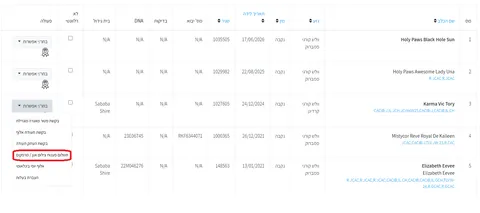
This is particularly relevant for owners of breeding dogs and breeds for which these orthopaedic examinations are mandatory for breeding approval.
Ordering a Champion Certificate
If your dog has fulfilled the requirements for the relevant title and the title already appears in the IKC system, you can order a champion certificate through your personal account.
In the menu, this service appears as תשלום תעודת אלוף.
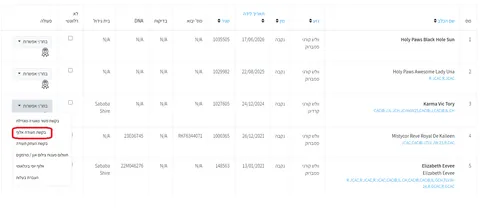
Before ordering, check הכלבים שלי and make sure that the relevant title is actually displayed under your dog’s name.
The IKC specifically notes that it is the owner’s responsibility to verify that the dog is entitled to the relevant title before ordering the certificate.
Pedigree Copy and Export Pedigree
Through the personal account, you can order:
העתק תעודה — a copy of the document/pedigree
or
תעודת יצוא — an export pedigree.
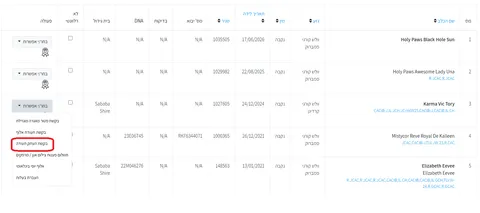
An export pedigree is required when a dog moves abroad and needs to be registered with a canine organisation in another country.
Do not confuse it with the regular digital pedigree available in the personal account for dogs born in Israel.
Transfer of Dog Ownership
The IKC personal account also allows you to transfer the dog to a new registered owner:
העברת בעלות — “Transfer of Ownership / Change of Owner.”
This function is used when a dog goes to a new owner and the ownership details in the IKC database need to be changed.
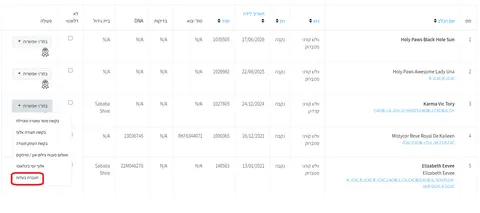
During the process, you will need to enter the new owner’s details and follow the instructions provided by the system. Once the transfer is complete, it is worth checking that the dog appears in the new owner’s personal account.
If You Are Using a Smartphone
On a smartphone, not all page elements may fit on the screen at once.
If you cannot see the button or action menu next to your dog’s profile, try scrolling the page to the right. In the mobile version of the website, some elements may be located outside the visible area of the screen.
The IKC specifically mentions this in its instructions for using the personal account.
IKC Club or Section Membership
The IKC includes clubs and sections that bring together owners of different breeds. Owners can join the club that covers their dog’s breed.
Even if you are not planning to breed your dog or regularly participate in shows, membership can still have practical benefits. It provides access to services and benefits available to members, including the confirmation required for the reduced annual fee for an intact dog.
Membership can be paid directly through your personal account.
Open תשלומים — “Payments” and select the option to pay the club/section membership fee.
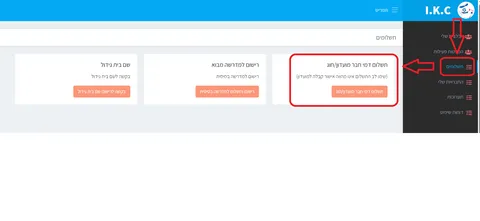
During the process, you will need to select the relevant club and breed.
Important: payment itself does not mean that you have automatically been accepted as a club member. It is a payment after which the relevant organisation must complete your membership registration.
How to Check Your Club Membership
There is a separate section for this:
החברויות שלי — “My Memberships.”
Here you can check your current membership status.
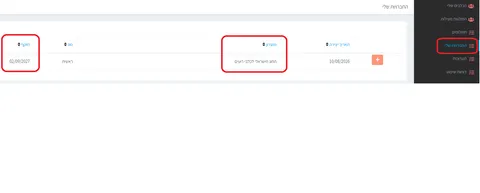
This is useful, for example, before requesting confirmation for the reduced municipal fee.
How to Register Your Dog for a Show
If you decide to try showing your dog, registration for many IKC shows can also be completed through your personal account.
Open:
תערוכות — “Shows.”
At the top of the page, you will see shows for which registration is currently open.
Before registering, carefully read the name and description of the event. It may be, for example, a specialty show organised by a particular club or an international show open to many breeds.
Next to the relevant show, click רשום כלב — “Register a Dog.”
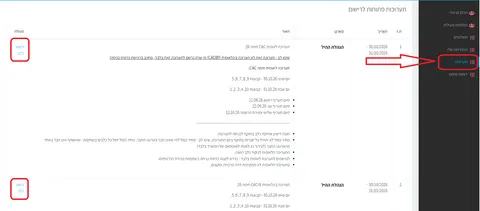
The registration form will then open.
First, check the name of the show at the top of the page once again, especially if registration is currently open for several events.
Select your dog from the list.
If you are registering several dogs, the system allows you to add them to the same registration.
For each dog, you must select a show class. The system offers the classes available to that dog based on the information in the database. Selecting a class is mandatory.
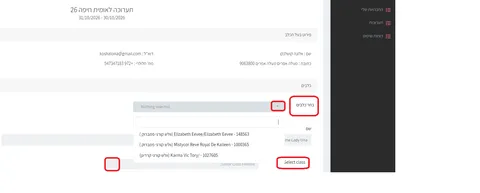
The registration fee is displayed on the page and recalculated as dogs are added.
Once you have checked all the information, you can proceed with the registration and payment.
Please note: if the registration has been created but payment has not yet been completed, the dog may not appear in your list of registered participants.
Where to Download the Judge’s Report
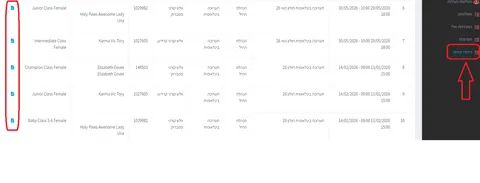
After the show, once the judge’s reports have been uploaded to the IKC website, they become available under דוחות שיפוט — “Judge’s Reports.”
The report can be downloaded as a PDF and saved together with your dog’s other documents.
This is convenient because reports from shows managed through the IKC system remain available to the owner in the personal account.
If Your Dog Does Not Appear in Your Personal Account
If, after logging in, you cannot see a dog that should be registered in your name, first make sure you logged in using the phone number that was provided when the owner was registered.
If the details are correct but the dog is still missing, contact the IKC.
The same applies if:
- your dog’s details are incorrect;
- a title your dog has earned is missing;
- the system does not allow you to register your dog for a show;
- you cannot log in to your personal account;
- a service you need is unavailable;
- you encounter another technical problem.
It is best to check the IKC website for current contact details and office hours, as these may change.
Quick Reference
Once you get used to the personal account, everything becomes quite straightforward:
View your dogs or their titles ➡ הכלבים שלי
Download a digital pedigree ➡ הכלבים שלי ➡ select the dog
Order a document for a specific dog ➡ הכלבים שלי ➡ action menu
Request confirmation for the reduced annual fee ➡ הכלבים שלי ⬅ בקשת פטור מאגרה מוגדלת
Pay for an official HD/ED evaluation ➡ הכלבים שלי ⬅ תשלום פענוח צילום אגן / מרפקים
Join a club or pay your membership fee ➡ תשלומים
Check your current membership ➡ החברויות שלי
Register your dog for a show ➡ תערוכות
Download a judge’s report after a show ➡ דוחות שיפוט — Judge’s Reports
Finally
The IKC personal account is useful not only for breeders and people who regularly attend dog shows. Even an ordinary pedigree dog owner should log in at least once, check their personal details and make sure the dog is correctly registered in their name.
After that, you may barely need the account for years — until one day you need a pedigree, confirmation for your municipality, a health-related document, show registration or another service.
So make sure you retain access to your account and that the phone number and email address registered in the system remain up to date.
And if you own one of our puppies and one day decide to enter the world of dog shows, be sure to contact us. We will be happy to explain how to get started, how to choose a show, which class to enter your dog in, and how to prepare for your first time in the ring.